Artwork Guidelines
Clear, print-ready artwork makes the difference between good packaging and great packaging. Follow these guidelines to ensure smooth production — or let Packestic handle it for you from concept to print.
If you’re unsure about anything in this process, don’t worry.
Our expert design team can refine your files — or create artwork from scratch.
File Formats
AI, PDF, EPS, PSD, TIFF (300 DPI)
Colors
CMYK + Pantone references preferred
Bleed
3mm bleed + 5mm safe zone
Fonts
Outlined or shared with files
Getting Your Artwork Print-Ready
At Packestic, we don’t just print boxes — we engineer brand experiences.
Your artwork is the bridge between your idea and the finished package in your customer’s hands. These guidelines help ensure your files move smoothly through design, prepress, and production — without delays, surprises, or quality compromises.
If anything here feels technical or confusing, don’t stress. Our packaging experts can refine your files — or design everything from scratch. You focus on your brand; we’ll handle the rest.
Preferred Files
To bring your packaging vision to life with precision and quality, we recommend submitting editable, vector-based artwork files. These allow our production and design team to work smoothly, make refinements when needed, and ensure flawless print results.
✅ Preferred file formats:
- Adobe Illustrator (.AI) — best and most recommended
- EPS
- SVG
- Editable PDF (vector-based)
These formats keep your artwork sharp at any size and allow us to make necessary adjustments for printing, cutting, and finishing.
⚠️ Files we can work with — but don’t recommend:
- CDR (CorelDRAW)
- PSD (Photoshop)
You can submit these, but please note:
- They may require additional conversion work
- They can increase turnaround time
- They may involve extra design costs
👉 Tip: If you’re unsure about your file type, just send what you have — our team will guide you.
If you have any questions about file formats, simply reach out to your Packestic design expert — we’ll get back to you quickly.
Colors
At Packestic, we print using CMYK or Pantone (PMS) inks — depending on your brand needs and production method.
🎯 Pantone (PMS) — Best for brand accuracy
If your brand relies on specific colors, we strongly recommend Pantone printing because:
- It delivers more consistent results across different print runs
- Colors look the same on every batch
- It reduces color variation between machines
🎨 CMYK — Standard printing option
- CMYK is great for:
- Full-color images
- Complex gradients
- Photographic artwork
However, CMYK colors can shift slightly across different printers and materials.
🔄 What if your file is in RGB?
No problem — we’ll convert it to CMYK automatically.
Before printing, we’ll always share a digital proof so you can approve how your colors will appear in print.
Dieline
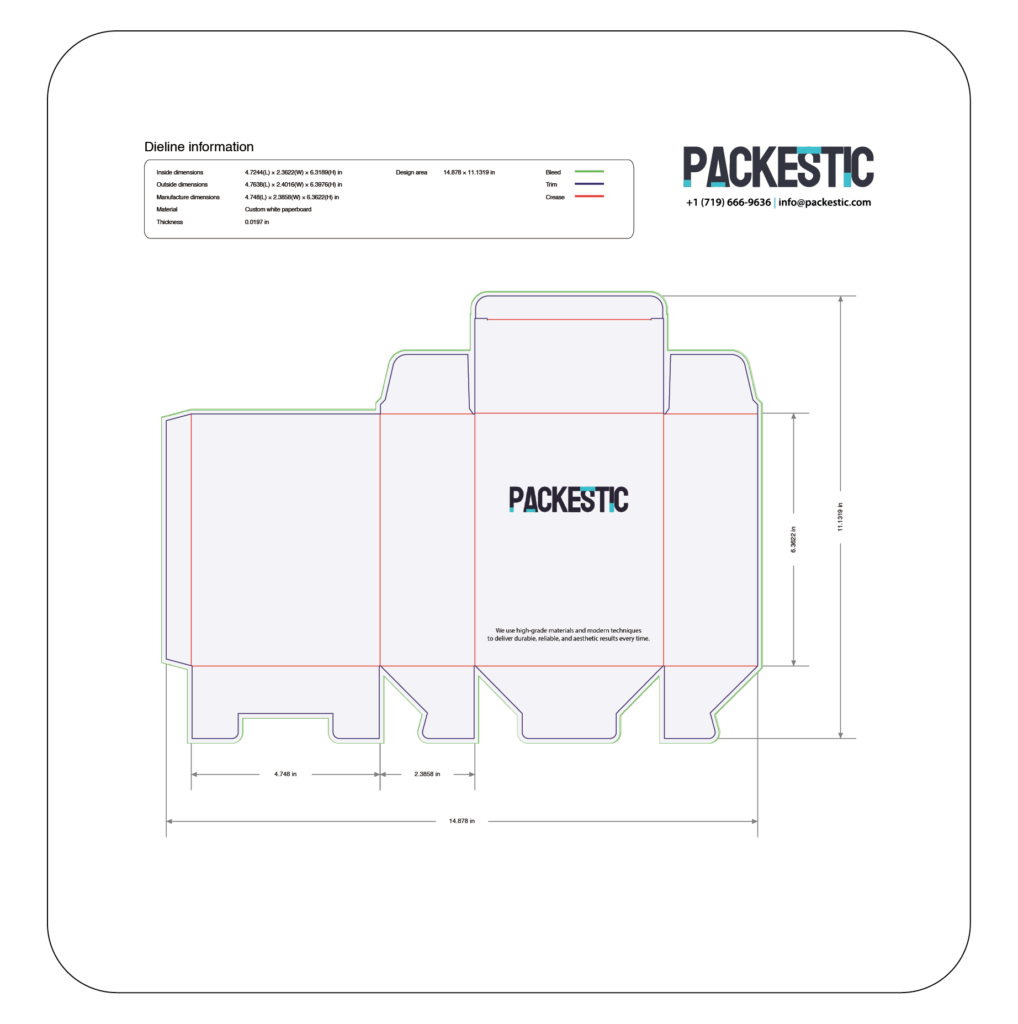
Your dieline is the blueprint of your box — accuracy here is critical.
Please make sure that:
- Your background extends fully to the bleed line
- All important artwork stays at least 1/8 inch away from cut and score lines
- Text, logos, and key elements are inside the safe zone
If you’re unsure how to work with dielines — don’t worry.
🎯 Packestic offers 100% free dieline support.
We can:
- Align your artwork correctly
- Adjust placement
Fix bleed issues - Optimize your design for manufacturing
Fonts & Typography
To prevent missing fonts or layout changes, please:
- Outline all fonts (convert to curves) in your artwork, OR
- Provide the font files separately
If you’re using a custom or licensed font, don’t worry —
🔒 Your fonts are safe with us. We never reuse or share client fonts with others.
📌 Important text & line guidelines
For best print results, keep in mind:
- Text should be at least 8pt (smaller text may blur in print)
- Avoid tiny, thin lettering in very light colors
- Use bold, clear colors for important text
- Registration alignment may vary up to 1/8 inch
- Add at least 0.25-inch bleed where graphics extend beyond the cut line
- Solid or dark lines should be at least 1pt thick
- Always embed or outline fonts
- When exporting PDFs, use Adobe PDF/X-1a preset if possible
UPCs & Barcodes
A poorly printed barcode can frustrate customers and retailers — so let’s get it right.
Please ensure:
- Barcode images are high resolution
- The size is large enough for easy scanning
- The background has enough contrast
If you’re unsure about size or placement, send your barcode separately — we’ll integrate it cleanly into your design in the most professional way.
Support Graphics
Great graphics can elevate your packaging from good to unforgettable.
Before sending your files, please ensure:
- All images are embedded (not linked)
- Files are high resolution (300 DPI minimum)
- No missing image links
If you prefer, you can send your images separately in a ZIP folder — whatever works best for your team.
Need Artwork? We Can Create It From Scratch.
Share your ideas, references, or brand assets — we’ll design, refine, and prepare production-ready artwork for you.
Need Design Help? We’ve Got You Covered
Packestic offers full packaging design services
- Creating artwork from scratch
- Brand-aligned packaging layouts
- Logo placement & typography
- Color selection & refinement
- 3D mockups and previews
- Print-ready file preparation
Just share your ideas, references, or brand style — and we’ll bring your vision to life.